Connect and inspect live data
Net F/T Viewer 0.1.1 is a cross-platform desktop application for one sensor. It combines raw counts, calibrated values, units, connection health, charts, bias, and buffered CSV recording without requiring ROS.
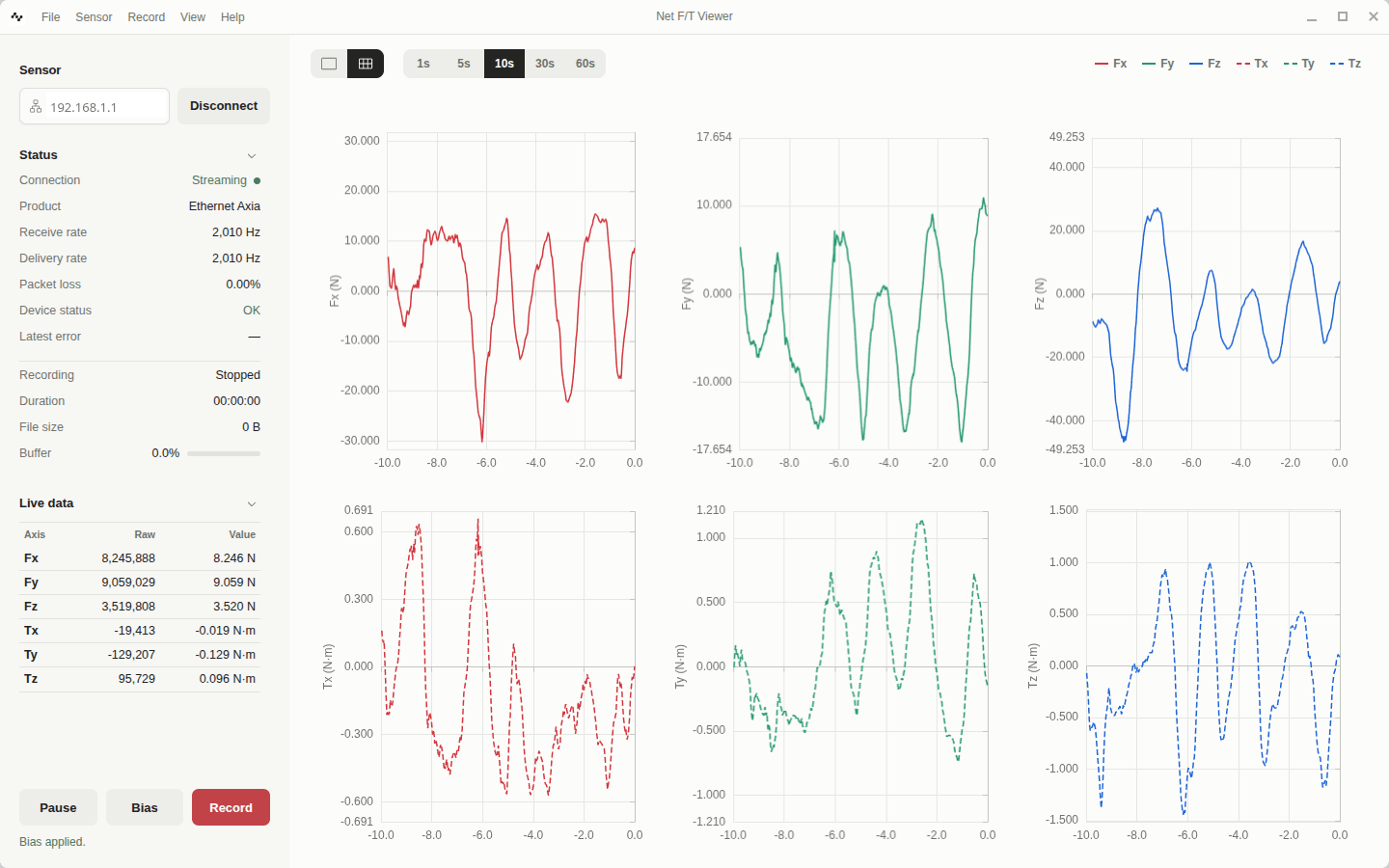
Install and connect
Download the installer or portable archive from GitHub Releases. Connect the computer and sensor to the same trusted IPv4 network, stop other RDT clients, enter the active sensor address, and select Connect.
The Status section reports connection state, product, receive and delivery rates, packet loss, device status, latest error, recording progress, and buffer use. Live data reports Fx through Tz as integer counts and calibrated values. Units come from the sensor configuration, not Viewer defaults.
Read the interface from left to right:
- Sensor owns the address and Connect/Disconnect action.
- Status answers whether acquisition is current and healthy.
- Recording shows capture state, duration, size, and queue pressure.
- Live data compares exact integer counts with calibrated values.
- The chart toolbar selects layout, time window, and visible axes.
Do not diagnose connectivity from the chart alone. A paused chart is intentionally static, and a reconnecting client can retain the last rendered trace while Status explains current acquisition.
If HTTP configuration succeeds but streaming does not, check the RDT port, firewall return path, and competing client. If values appear with the wrong scale, disconnect, verify the active calibration, and reconnect rather than applying a visual multiplier.
Read the charts
Combined overlays selected axes and aligns the force and torque zero positions while keeping distinct force and torque scales. 6 panels gives every axis its own chart. X, Y, and Z use consistent red, green, and blue semantics; force is solid and torque is dashed.
Choose a 1, 5, 10, 30, or 60 second fixed time window and show or hide each axis. Chart refresh is intentionally slower than sensor acquisition. The Viewer displays current behavior; it is not evidence that every packet was recorded.
Bias safely
Bias is unavailable while paused and requires confirmation. Remove load, stop hazardous motion, ensure downstream users cannot react to the zero step, and inspect current values before confirming. A successful command send is followed by fresh acquisition; verify healthy data and zero behavior rather than assuming completion.
Continue with Record and review a session when every accepted sample must be preserved. The exact file contract is in CSV schemas.